
Movie Maker Edit Pro, Desktop Edition v7.4
Grok Imagine and Gemini Veo produce 6 to 15 second clips. Point Movie Maker Edit 7.4 at the folder and get a finished, exported ad, TV show or movie. It does not care where the clips came from.
Movie Maker Edit, Web Edition is free. It runs in any browser, including Windows, Mac, iPad and Android, with no installation, no account, no watermark and no export limit.
Point it at a folder of clips. Press Autoproduce. It reads every clip, orders them, sets the transitions, renders the movie, levels the sound to a steady volume and reports what it produced at every stage. State is written before every stage, so a run that halts picks up exactly where it left off rather than starting over, and Cancel takes effect immediately on work already in flight, so stop means stop. Projects live in real folders on your own device and your footage never leaves it.
Even with no key connected it is a complete editor: import clips in virtually any format, trim with resealed cuts, set blur or hard cut transitions, keep, replace or mix the soundtrack, choose resolution and aspect ratio, preview, and export one MP4 or MOV. Exports run across every processor core and the audio is leveled automatically to −16 LUFS so the whole movie plays at one volume. Every film lives in one folder with your clips untouched and exports, projects, soundtrack and reviews beside them.
Add your own xAI or Google key and five AI tools sit on top. AI Review of Clips watches each clip once and catches what a human eye slides past on the twentieth viewing: scrambled text on a sign, a car with no far side, a face that morphs, a frozen last second, a jacket that changes color between shots. It names the broken ones and tells you what is wrong, so you regenerate them before the render instead of finding out on a big screen with the generator session long gone, and on a long production it hands you the short list instead of making you watch everything twice. AI Review of Movie puts three critics on your finished cut, scoring it out of 100 and naming what works, what does not and what you can fix here. Narration returns word-level timings and speaker labels, editable, out as SRT or WebVTT. Spoken voice reads any line you type in one of five voices. Add Captions burns them into the picture in five styles, four sizes, three positions and your own colors, with a live preview, and costs nothing to run because the narration script is already paid for. A whole feature comes to under $1.00 in API token usage. Every job quotes its price before it sends anything, and the app tracks what you have spent.
How long it actually takes, end to end rather than the render alone. A 2 minute video of 9 clips runs about 10 minutes in the browser and 5 in Pro. A 10 minute show of 43 clips, about 45 minutes in the browser and 8 in Pro. A 30 minute program of 129 clips, about 2 hours 20 in the browser and 20 minutes in Pro. A 90 minute feature of 386 clips is Pro only, under an hour, and a 150 minute feature of 643 clips about an hour and a half. Those are real runs: Alternative Dimensions, an 82 minute feature cut from 347 Grok Imagine clips, imported in 20 minutes and was a finished, leveled movie inside the hour.
Prefer to drive it yourself? Sixteen numbered steps take you from import to export with nothing to guess at, each ticking green as it completes. Original soundtracks come from Lyric Remix Studio.
When you are ready for longer work, Movie Maker Edit Pro, Desktop Edition, is $149.99 once, in the Microsoft Store and on Gumroad and Lemon Squeezy. The difference is what it runs on. A browser tab encodes in WebAssembly and has to hold the whole movie in memory, so exports run in hours and long films stop where that memory stops. Pro uses every processor core and drives native FFmpeg straight into whatever hardware encoder your machine has, NVIDIA, Intel or AMD, confirmed with a real encode at startup so you know it works before the first clip is touched, and streams to disk instead of RAM, so exports finish in minutes and films run to 150 minutes and past 20GB. Native FFmpeg also means it decodes older camcorder and archival codecs, so family video from twenty years ago in a format nothing will open will almost certainly open here. Both share a project format, so a movie you start in a browser finishes in Pro.
NO API KEY IS NEEDED TO EDIT. The five AI features run on your own xAI or Google key, and generation is billed by those providers directly to your accounts.
Microsoft Store
Live in the Store now. Auto-installs and updates, and there is no license key to keep track of.
Gumroad
One-time purchase of $149.99. Emails you a license key and a download link straight after checkout.
Lemon Squeezy
One-time purchase of $149.99. Same installer, same license key by email, a second checkout if you prefer it.
Free Web Edition
The same editor in your browser, on Mac, iPad and Android as well as Windows: point it at a folder of clips and get a finished, exported movie. No install, no account, nothing to pay, ever.
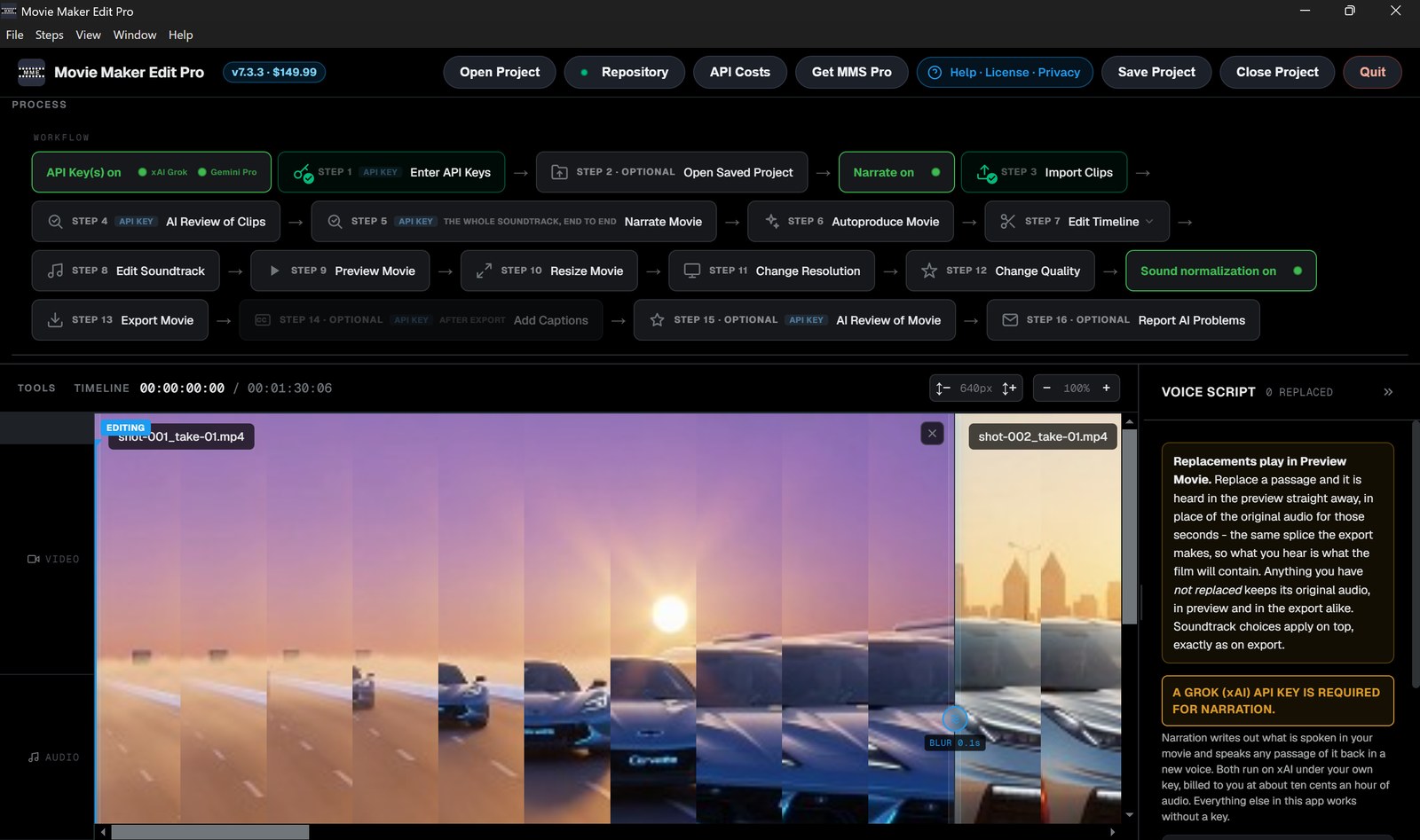
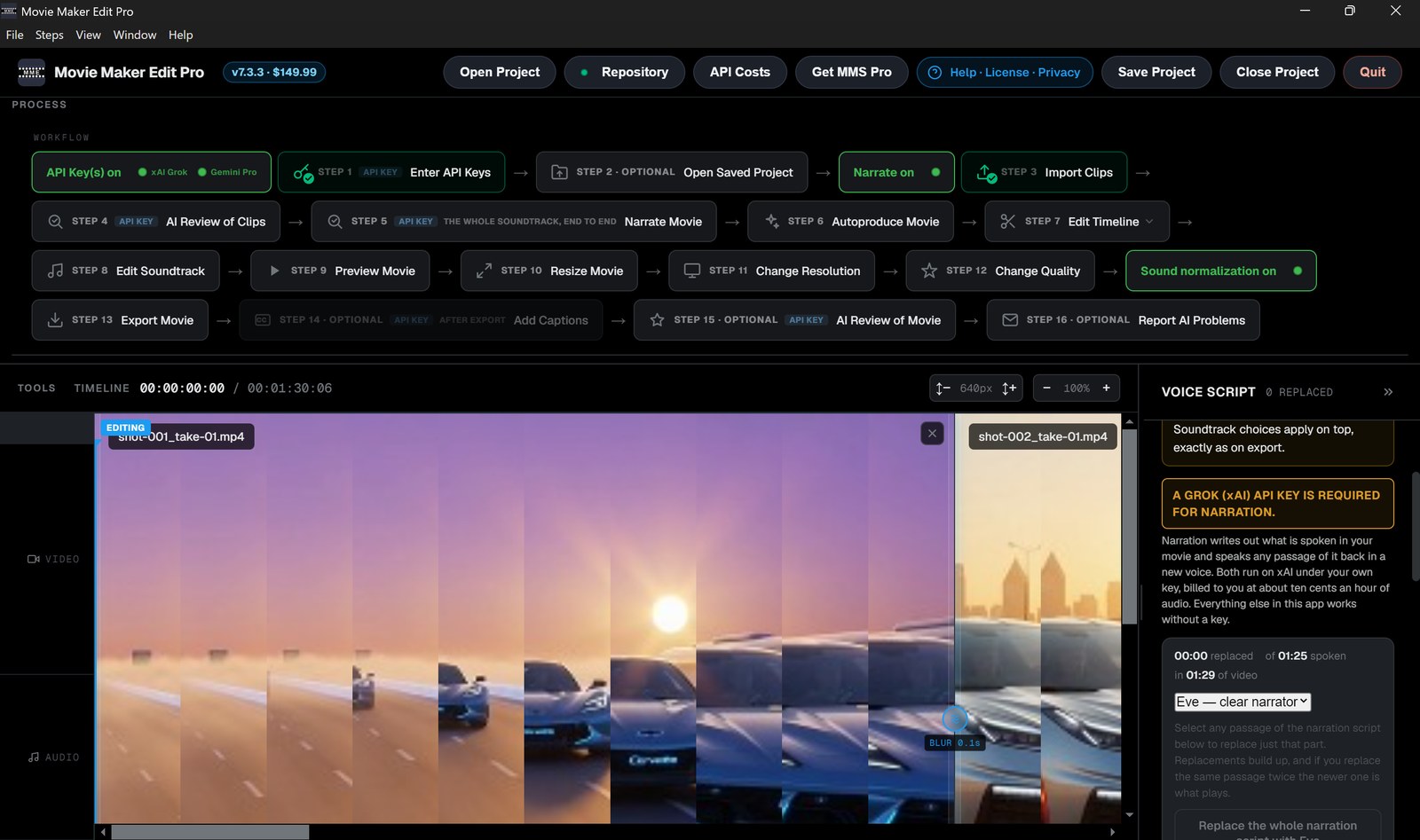
Ten screens from Movie Maker Edit Pro, in the order you would meet them.
1 of 10
Movie Maker Edit - Simple to use - Sixteen numbered steps, or one press
Goal: Point it at a folder of clips and get a single finished movie back. The workflow line runs left to right in the order the work is done, with a green tick once each step is finished. Four steps need an API key. The other twelve never do.
Enter API Keys
Optional, and only for the five AI features: narration, spoken voice, Add Captions, AI Review of Clips and AI Review of Movie. Grok or Google. Two lights show which provider has actually accepted a key.
Open Project
Reopen a saved .mmeproj exactly as you left it, filmstrips included. It remembers the folder your film belongs to, so exports and saves keep going where they always went.
Import Clips
As many as you like at once. MP4, MOV and WebM directly; AVI, MKV, MTS, WMV and others convert automatically. The first clip sets the shape of the film, so square footage gives a square film.
AI Review of Clips
Samples frames through every clip and names the ones that came back broken: a shot that freezes, a face that changes between frames, garbled text, a black tail. Regenerate them before you spend the render time rather than after. Every review is saved beside your film.
Narrate Movie
Writes out what is spoken in the whole film as one continuous narration script, timed to the words in it, in one job over the assembled soundtrack. Select any passage and have it spoken back in a new voice.
Autoproduce Movie
The whole film in one press: imports in filename order, builds the filmstrips, reviews the clips if you have a key, joins them with blur transitions, renders, and levels the soundtrack.
Edit Timeline
Trim sections with the join resealed, and set the blur between clips.
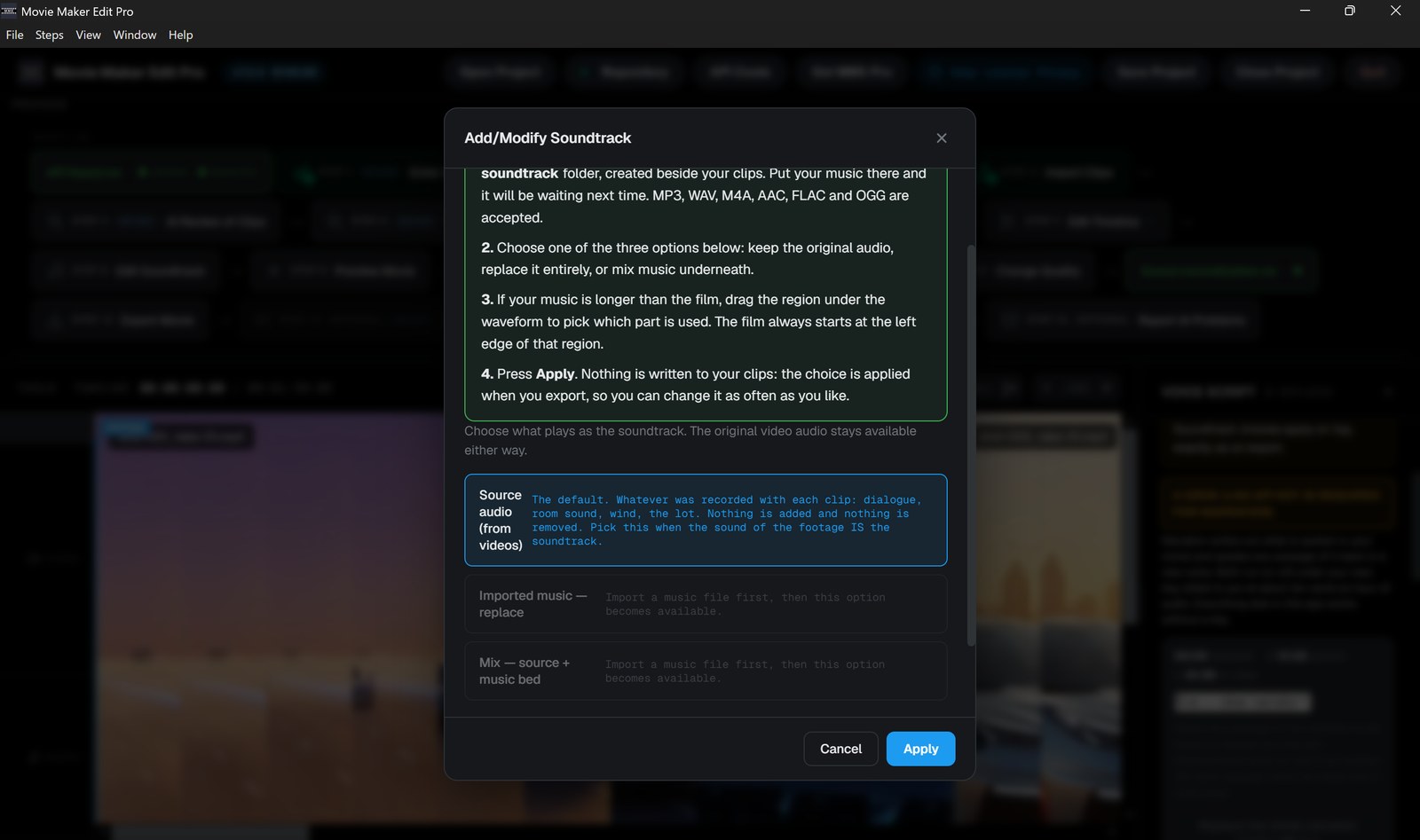
Edit Soundtrack
Keep the original audio, replace it with music, or mix music underneath at 40%.
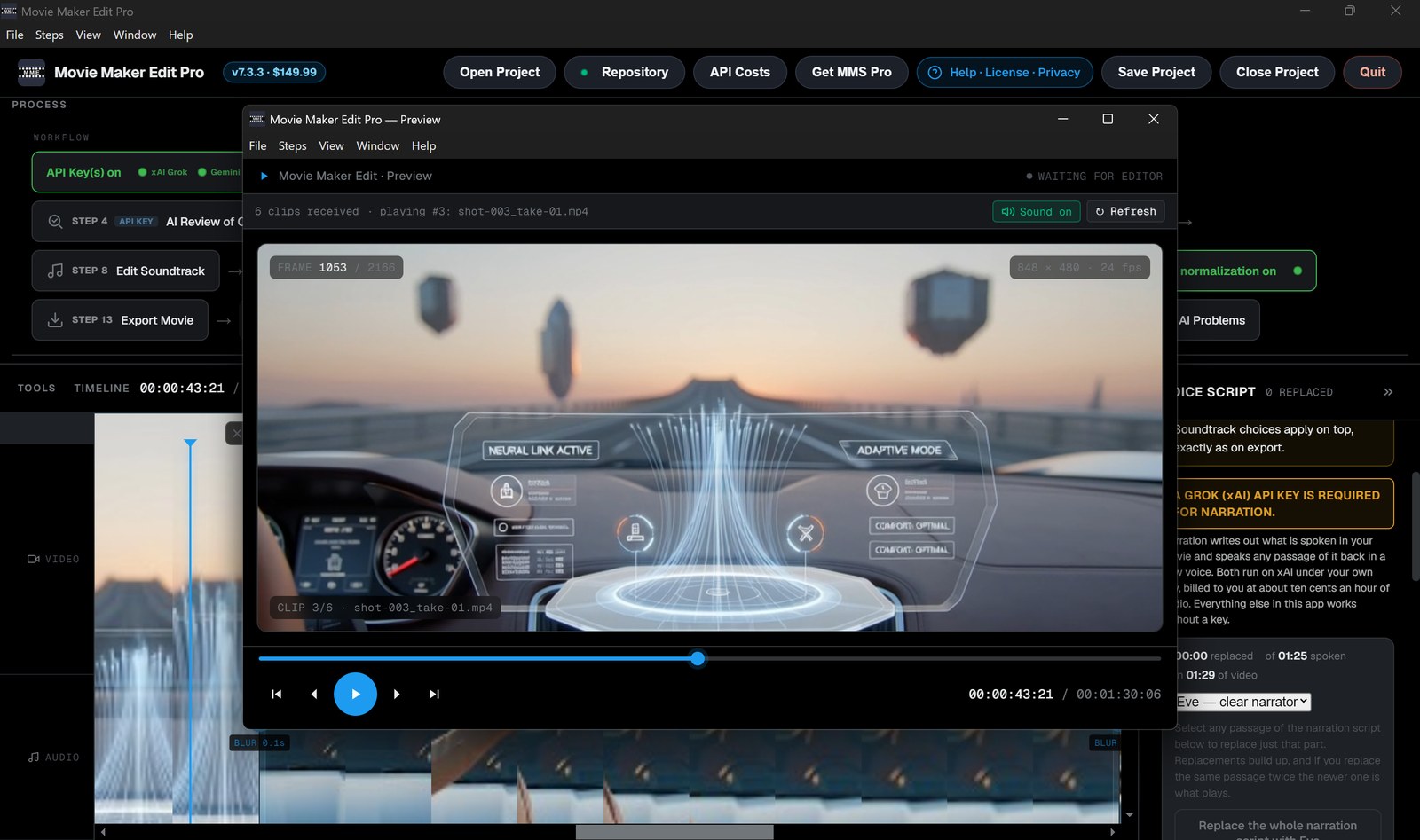
Preview Movie
Watch the whole thing in a separate window before rendering.
Resize Movie
16:9, 9:16, 1:1 or 4:3, fit or fill.
Change Resolution
480p, 720p, 1080p or 4K. The review works out the right ceiling and never suggests upscaling.
Change Quality
Small file, balanced or best quality.
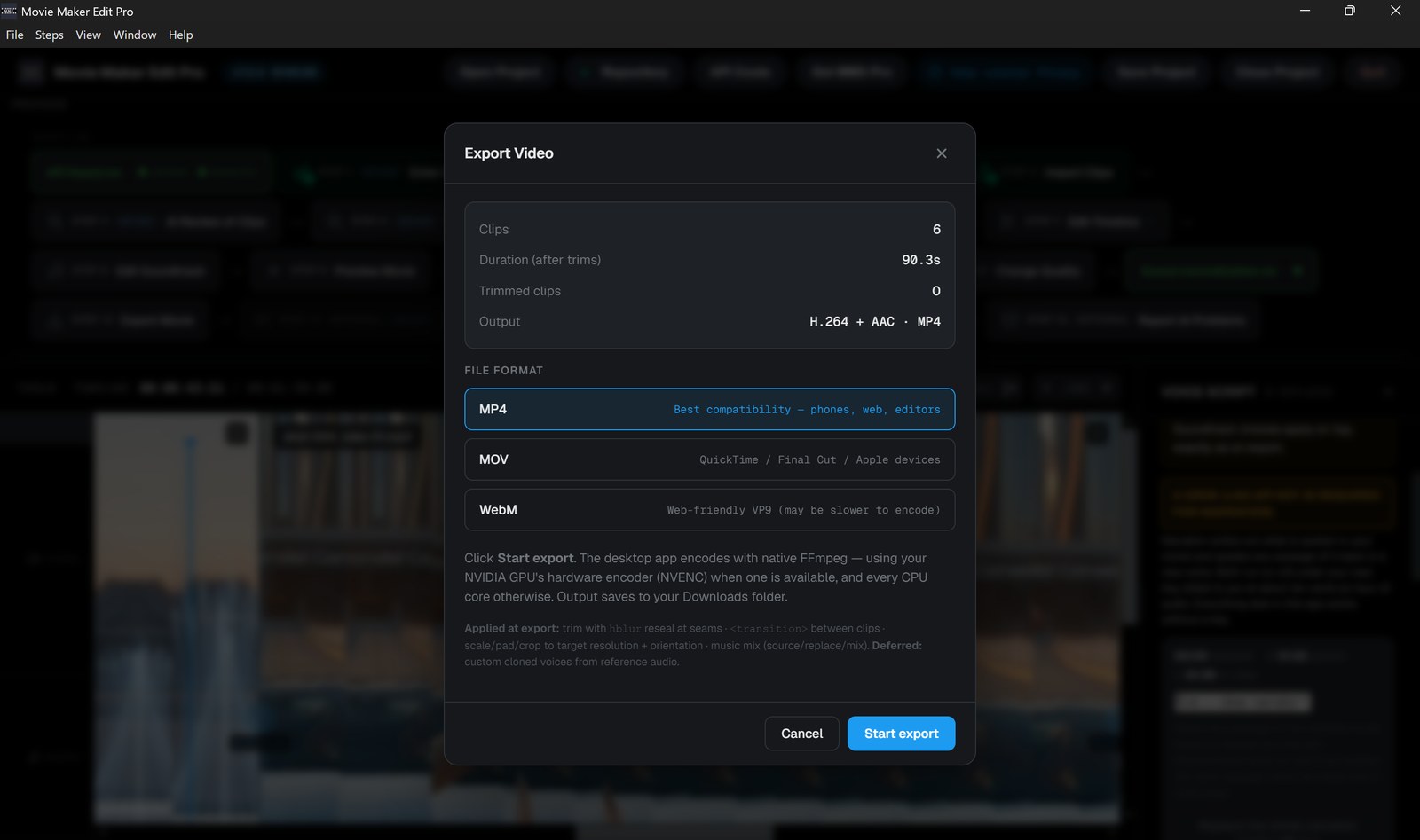
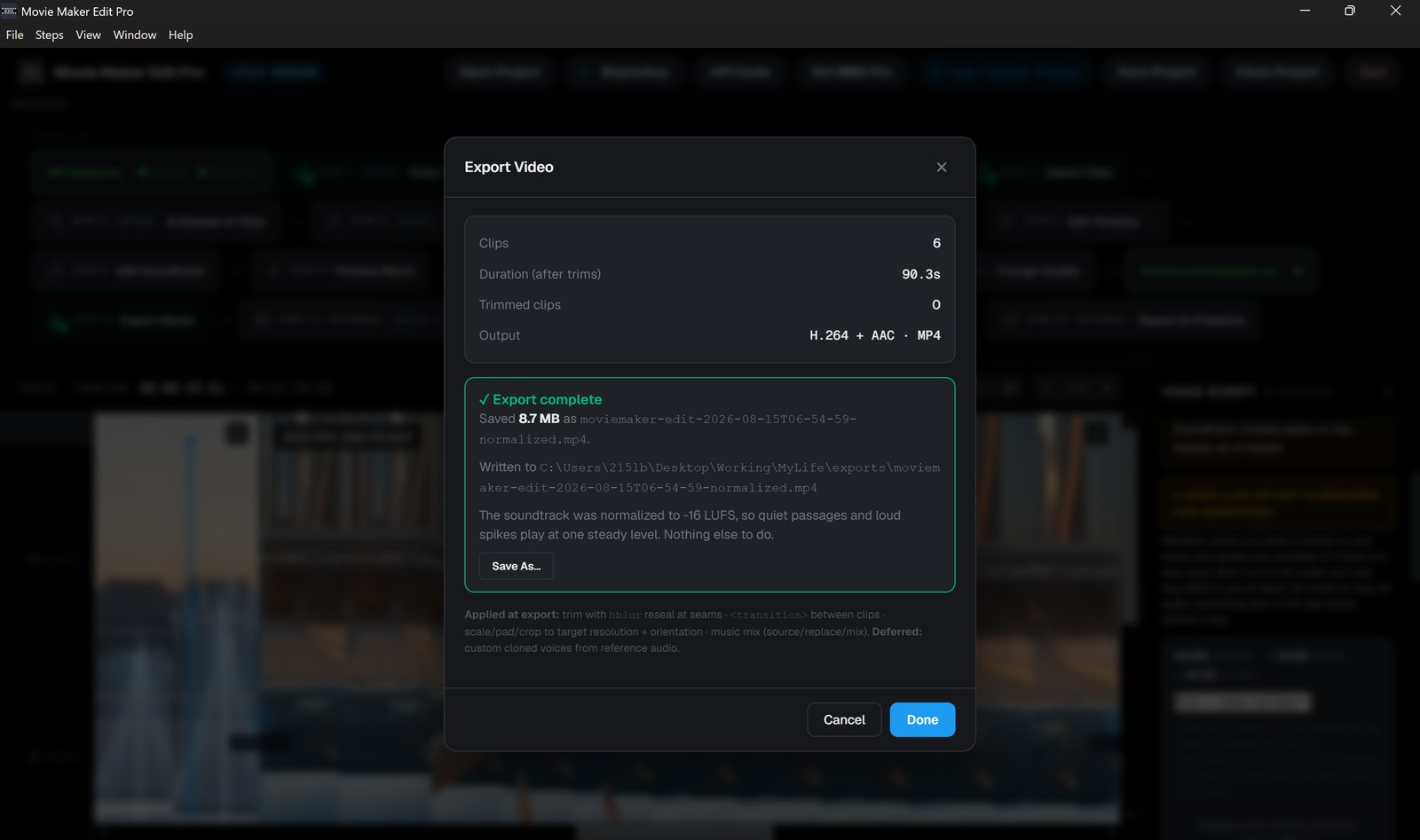
Export Movie
MP4, MOV or WebM, with sound normalization on by default so the film plays at one steady level. The finished film and its project file are filed beside your clips, whether you built it in one sitting or reopened it a week later.
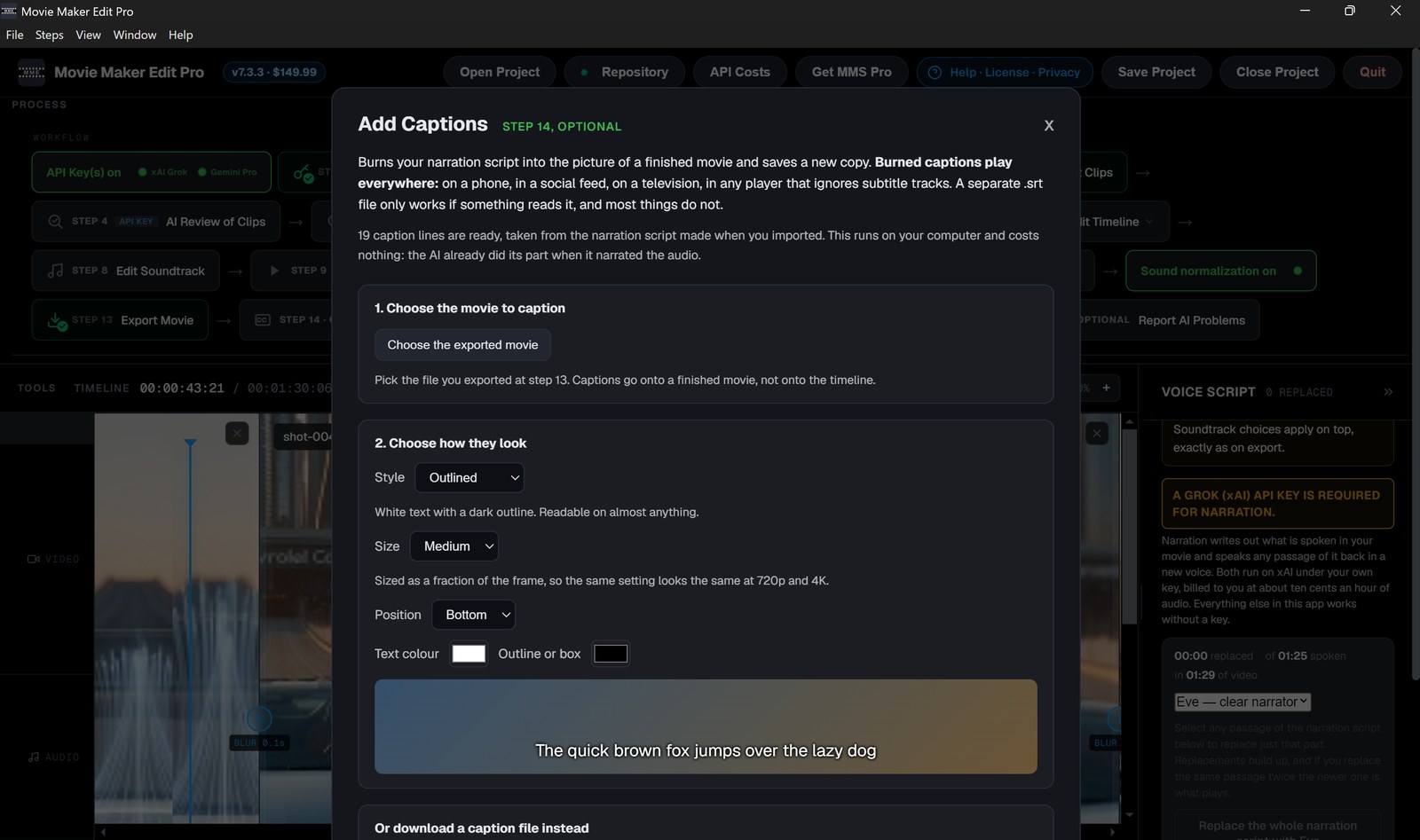
Add Captions
Burns your narration script into the picture. Five styles, four sizes, three positions, your own colors, with a live sample. Burned captions play everywhere, including feeds that ignore subtitle files.
AI Review of Movie
A critic’s verdict on the finished film: a score out of 100, what works, what does not, and changes you can actually make. Saved beside your film as a file you can keep.
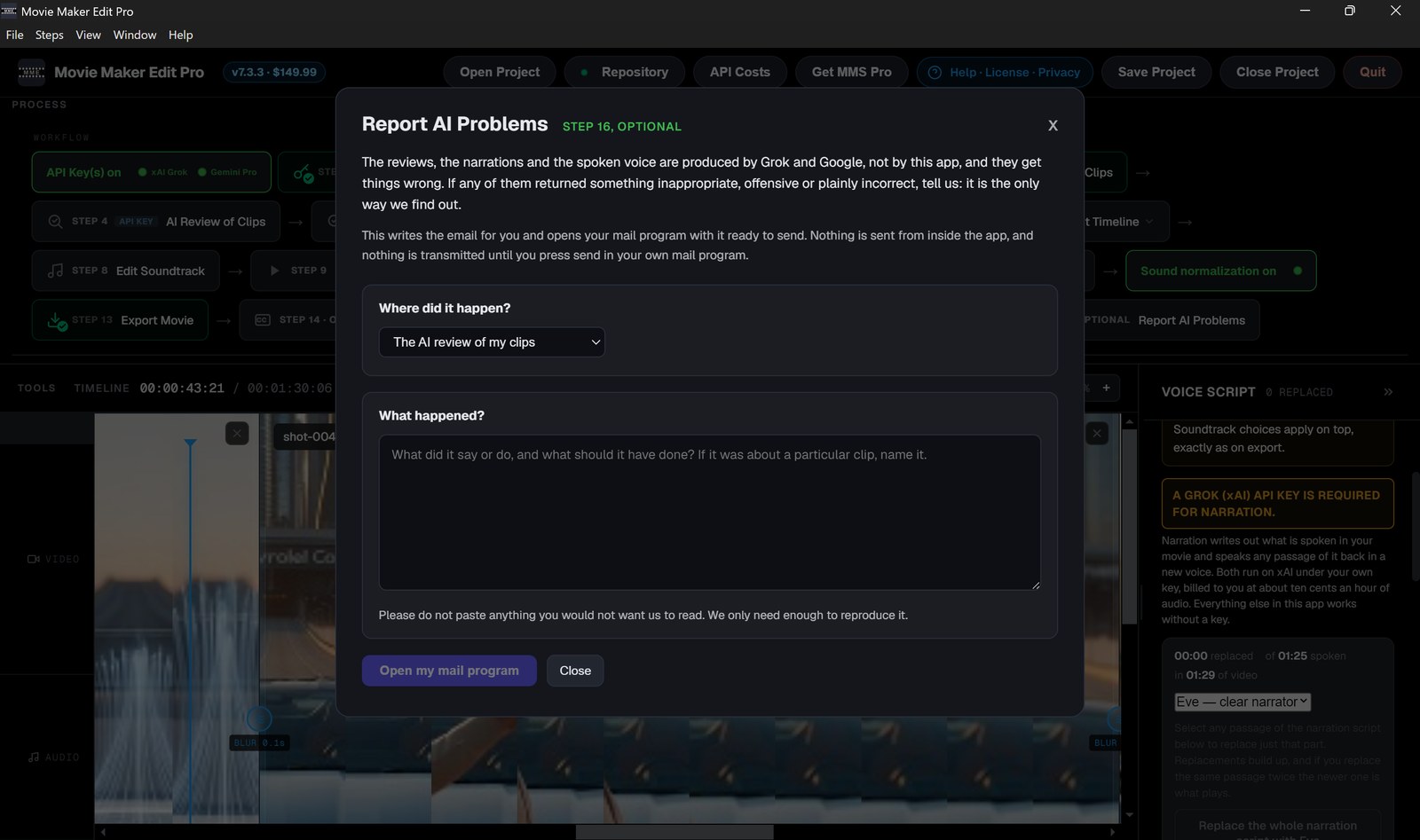
Report AI Problems
Writes the email for you when a provider returns something wrong.
Movie Maker Edit Pro - What people are going to do with this
Movie Maker Edit does not care where your clips came from. That is what makes its list different from Studio's: everything below starts with footage that already exists.
Clips from any generator, in one film
Grok Imagine, Gemini Veo, or anything else that writes 6 to 15 second clips. Point it at the folder, press Autoproduce, and get a finished, exported movie back.
Family video nothing else will open
Native FFmpeg decodes older camcorder and archival codecs, so tapes from twenty years ago in a format no modern editor recognizes will almost certainly open here.
A feature-length assembly on an ordinary PC
A 150 minute film of 643 clips runs about an hour and a half end to end, streaming to disk rather than holding the movie in memory, past 20GB if it needs to.
One volume across the whole film
Audio is levelled automatically to −16 LUFS, so a hundred clips from a hundred different generations play at one level instead of jumping shot to shot.
Captions and narration without a separate tool
Transcription returns word-level timings and speaker labels as SRT or WebVTT, spoken voice reads any line you type, and Add Captions burns them into the picture in five styles.
Catching the broken clip before the render
AI Review of Clips watches each clip once and names the ones with scrambled signage, a morphing face or a frozen last second, so you regenerate them before you find out on a big screen.
Movie Maker Edit Pro - Frequently asked questions
Do I need an API key?
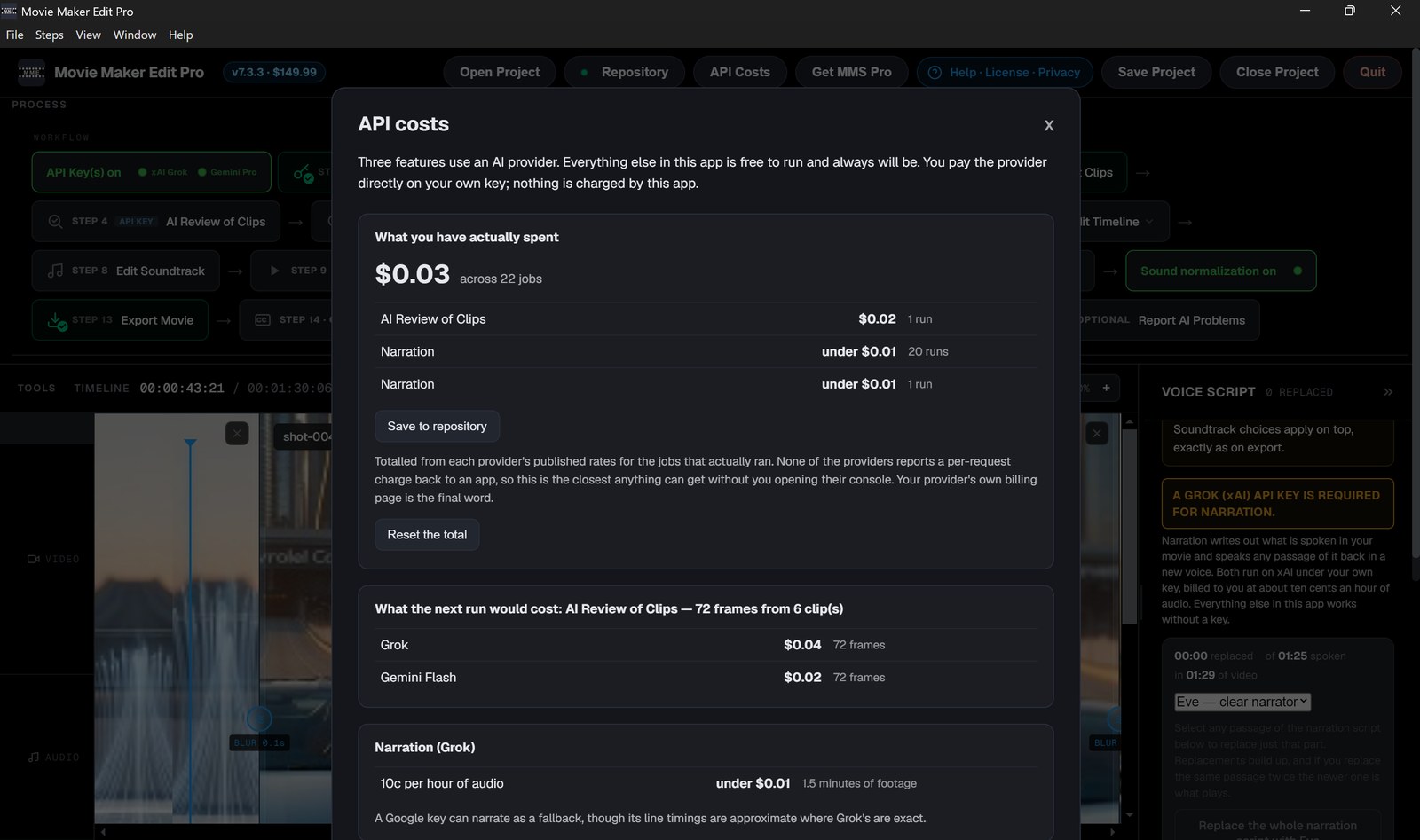
Five AI features come built in: narration, spoken voice, Add Captions, AI Review of Clips and AI Review of Movie. They run on a Grok (xAI) or Google key you supply and pay for directly, at a few cents a film. Everything else, importing through export, runs on your own machine and needs no key at all.
Which key, and does it need a subscription?
A funded Grok (xAI) key is the one to have and no subscription is required: create an account, add a few dollars of credit, and pay only for what you use. It does all five features. A Google Gemini key is optional and needs more: a Gemini Pro subscription and billing on Tier 1 or higher. It can review clips and narrate as a fallback, but cannot speak text back.
Is there a subscription for the app itself?
No. One payment of $149.99, no account, no watermark, no expiry. Updates are included.
What formats can I import?
MP4, MOV and WebM are used directly. AVI, MKV, MTS, M2TS, WMV, FLV, 3GP, VOB and OGV are converted automatically on import. Music can be MP3, WAV, M4A, AAC, FLAC or OGG.
Can it handle a feature-length film?
Yes. Export runs on native FFmpeg using your NVIDIA, Intel Quick Sync or AMD GPU when one is available and all CPU cores when it is not, and multi-gigabyte sources and outputs are streamed to disk rather than held in memory.
Where do my finished movies go?
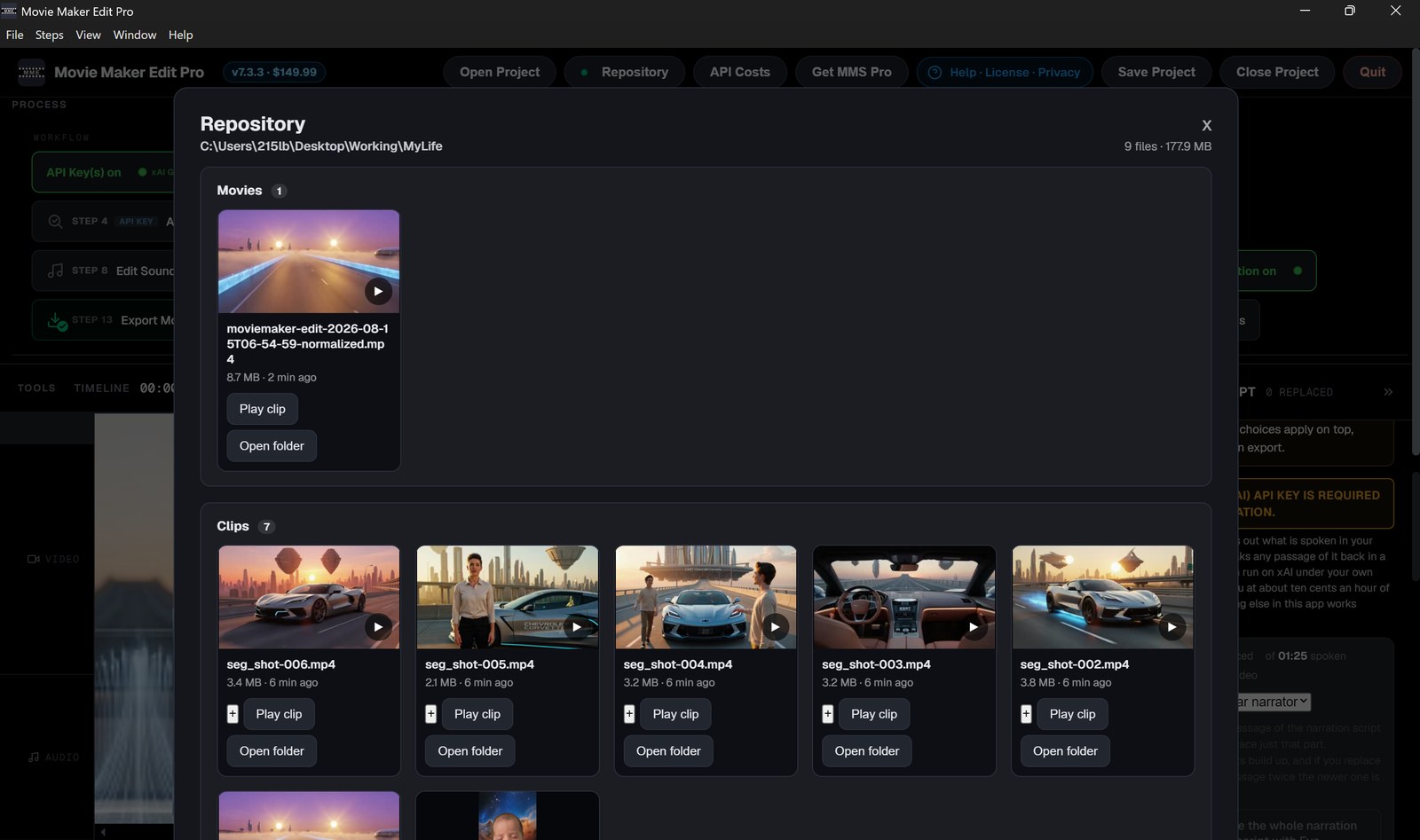
Into an exports folder beside your clips, along with the project file and any
music, so one film lives in one folder. A second export of the same film is numbered rather
than replacing the first.
Does my footage leave my computer?
Not for editing or rendering. The AI features send only what they need, and only when you use them: small still frames for a review, the audio track for narration, and your typed text for spoken voice. Whole clips are never uploaded, and your API keys are stored on your machine and sent only to the provider they belong to.
New in Movie Maker Edit 7.3
- Burned-in captions render onto the picture and save correctly. The cuts between clips now land on exact frame boundaries, so sound and picture stay together across a long film.
- Sixteen numbered steps take you from clips to a finished movie — or one press of Autoproduce Movie builds the whole thing without stopping.
- AI Review of Clips names the clips that came back broken, so you regenerate them before you render. AI Review of Movie scores the finished film and tells you what to fix. Add Captions burns your narration script into the picture in five styles.
- Narration and spoken voice moved to Grok: far more accurate, exact line timings, and five voices that sound like people. These need an API key from Grok or Google, which you supply and pay for directly.
- Soundtrack levelling now happens automatically on every export, so the separate Normalize Audio step is gone.
- Your repository keeps each film in one folder with its clips, project, music, reviews and subtitle files, all browsable inside the app. API Costs shows what you have actually spent.
- Reopening a saved project no longer moves your film. A project remembers the folder it belongs to, so exports and saves land beside your clips instead of in a temporary folder Windows is free to delete.
- Every AI review is written to disk beside the film as a readable file, timestamped so a later run never overwrites an earlier one.
- The API Keys screen names all five features that use a key, what each one does, and what each one costs.
- Vertical and square footage now sets the film's shape at import. Exports are about a third smaller at the same picture quality.
Can I try before I buy?
Yes, both of them. Movie Maker Studio, Web Edition and Movie Maker Edit, Web Edition both run in any browser. No install, no account, nothing to pay, ever.
In each case the web edition and the desktop edition are the same software. They differ in the length of production they can finish and how fast they finish it. Both free editions open from the buttons at the top of this page.
Other free AI apps from Iacoletti Software
Featured on There's An AI For That. Each application is engineered to a professional standard, putting frontier AI capability that once belonged to studios and specialist firms directly in your hands.
🎬 Free Movie Maker Studio, Web Edition v7.4
Turn a written description into a finished ad, TV show or movie, up to 46 minutes. It builds the reference images, writes the prompts, generates the clips, assembles them and exports the file. Runs in Chrome or Edge with no installation, no account and no watermark, in over 100 languages.
Free with your xAI API key. No subscription.
🎬 Movie Maker Create (Grok) v5.2
Generate clips of six to fifteen seconds with xAI Grok Imagine, watermark-free and with synchronized audio generated in the same pass, at 480p, 720p or 1080p, then bring them straight back into the Studio or the editor. Four modes are unlocked from the start: text to video, image to video, reference images, and extending a clip you have already made.
Free with your xAI API key. No Pro tier, SuperGrok or X Premium subscription required.
🎥 Movie Maker Gemini (Veo) v5.2
Generate four, six or eight second clips with Google Veo 3.1 at 720p, 1080p or 4K, each with native audio, when you want a second engine or when your Grok session is spent for the day. Five modes, including first and last frame: give it a start image and an end image and it generates the movement between them.
Free with your Google API key, on a Google AI Pro subscription or better with Google Cloud billing at Tier 1.
🎵 Lyric Remix Studio Gemini v6.2
Turn any song idea into an original track you can actually play. Rewrite the words by structure, emotion, subject or language, pick an era from wax cylinder and Sousa concert band through to thrash and hip-hop, and Google Lyria 3 composes the finished recording. Printable lyric sheets with optional guitar chords, and album art for about a cent more.
Free with your Google API key, on a Google Pro subscription or better with Google Cloud billing at Tier 1.
📖 Wiki 2066 v5.2
Find out what your life might look like in a century, or in ten. Wiki 2066 v5.2 writes anyone a full Wikipedia-style biography set in the future, grounded in who they really are.
Free with your xAI and Anthropic API keys. About thirty cents an entry.
🔍 Describe That Claude v5.2
Know exactly what is in a photograph or a PDF, including everything you did not notice. Describe That Claude v5.2 profiles every person and catalogues every object, vehicle, animal, structure and sign, powered by Claude Sonnet 5. Reports save as PDF with the tokens and cost printed on them.
Free with your Anthropic API key. About ten cents an image.
⚖️ What's The Catch Claude v5.2
Find the catch before you sign it. What's The Catch Claude v5.2 reads a contract, policy or offer and tells you what it will really cost you, from a legal, financial, medical and business perspective. Upload a PDF or photograph the pages in front of you, and use it in their office before you sign, not after.
Free with your Anthropic API key. About ten to fifty cents a review.
🛡️ ScamCheck Claude v5.2
Find out whether the message in front of you is a scam, before you reply, click or send money. ScamCheck Claude v5.2 reads photos, screenshots and PDFs and names the fraud for what it is.
Free with your Anthropic API key.
🛡️ ScamCheck Grok v5.2
Find out whether the message in front of you is a scam, before you reply, click or send money. ScamCheck Grok v5.2 reads photos and screenshots, and is the cheapest scan in the suite.
Free with your xAI API key.
Examples of Movies made with Iacoletti Software Movie Maker products
Two feature-length films, free to watch on There's An AI For That. Both were built clip by clip with the software on this page: reference images developed from text prompts in Grok and Gemini, clips generated with Grok Imagine and Movie Maker Create, music generated by Lyric Remix Studio Gemini, and everything assembled in Movie Maker Edit Pro, Desktop Edition.
BASIL (2026)
A 2 hour 59 minute movie made from 950 Grok Imagine clips. It takes place in 2026 through 2116 and follows Mira and Amos through ninety years of technological change and how the changes affect them, their friends and their families. Produced in Movie Maker Studio Pro v7.3, the movie was made on an ordinary laptop computer. The story opens on a treatment anyone can walk into a pharmacy in 2026 and ask for, reaches 2073 and the first crossing, when a person is copied into substrate, and ends in the year 2116 when after the discovery of zero-point energy and gravity propulsion enables humanity to reach the stars.
Alternative Dimensions – The Movie (2026)
Believed to be the first full-length feature movie ever made with Grok Imagine clips, assembled and refined in Movie Maker Edit Pro with the soundtrack normalized to a steady, consistent level. It follows one woman across centuries and infinite branches as she enters substrate, becomes a signal sent forward through time, and apprentices with the Jathuun, the genies of humanity's oldest stories, learning to step between worlds by will alone. One creator carried the whole project from book to images to videos to movie: no studio, no crew, just frontier AI and purpose-built software.
Official Platforms, Retailers, Publishers, Models, Tools and Partners
1&1 Mobile Service
AMD AMF Hardware Encoding
Anthropic API
DeepL Pro Translation Service
Electron Desktop App Framework
FFmpeg Video Encoding Engine
Google Cloud API
Google Fi Mobile Service
Google Pixel Phones
HP Laptops
Intel Quick Sync Hardware Encoding
Microsoft Azure Artifact Signing
Microsoft GitHub Source Code Hosting
Microsoft Windows 11 Operating System
MSI Laptops
Node.js JavaScript Runtime
NVIDIA NVENC Hardware Encoding
React User Interface Library
Samsung Monitors
SpaceXAI API
TypeScript Programming Language
Vercel Hosting Service
Verizon Fios Internet Service
Google Gemini 3.1 Flash Image
Google Lyria 3


Iacoletti Software builds Windows desktop and browser applications, publishes fiction and nonfiction in English and German, and produces feature-length films with its own tools. We are always interested in new partnering opportunities across all of it: business growth, sales and marketing, consulting, training, technical support, publishing, translation and distribution. If you can help, drop us a line at iacolettisoftware at gmail.com.
